The Particle editor opens a single .particle.json effect and lets you shape it while the real particle simulation runs in front of you. Every edit applies to the preview immediately and is saved back to the file automatically, so there is no separate apply or save step.
Opening the editor
There are two ways in:
- Double-click a
.particle.jsonfile in the Assets panel. - Create a new effect with +PFX, then edit the file it produces.
Layout
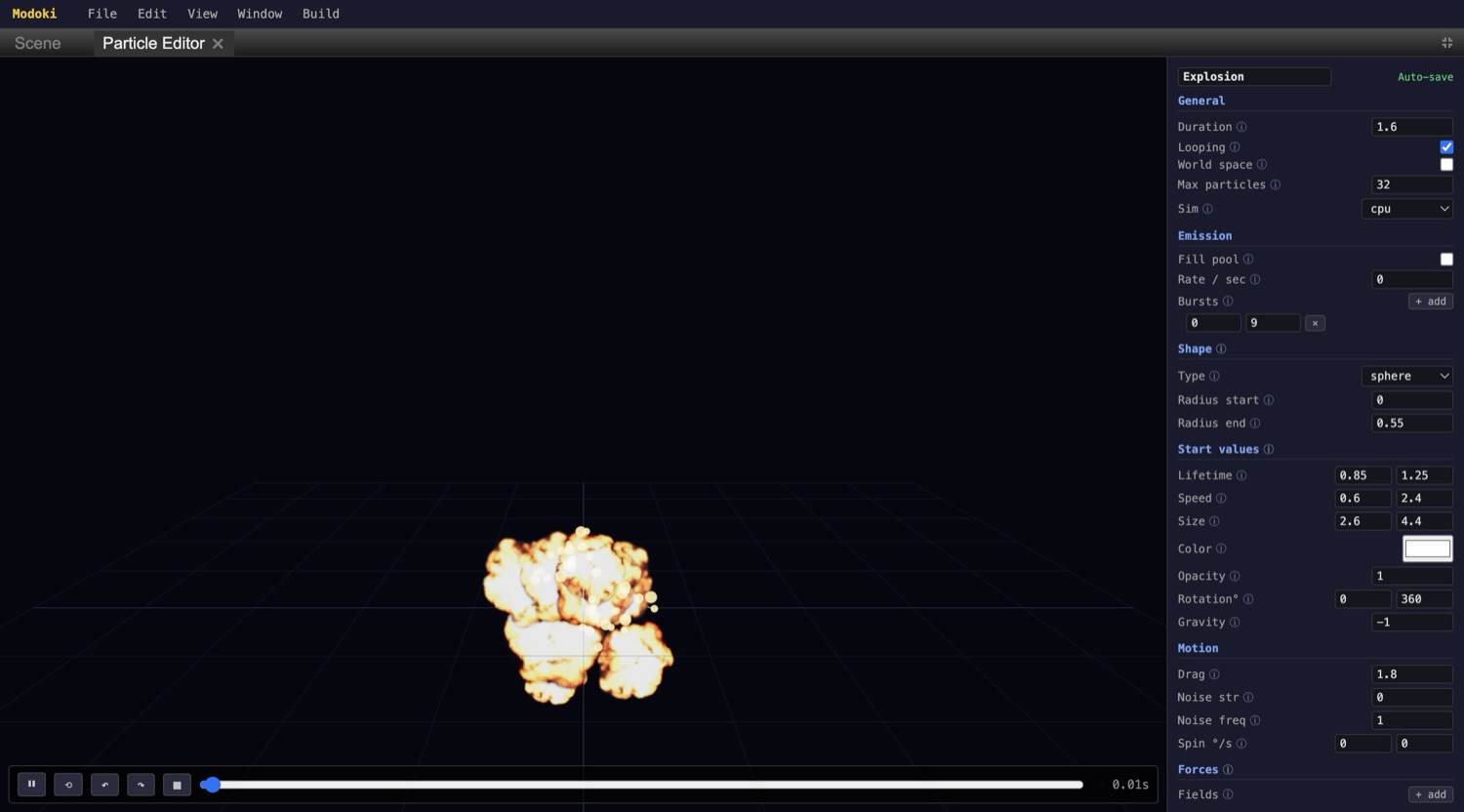
The editor is split three ways:
- Preview viewport (left) — runs the actual particle simulation with an orbit camera and a grid floor, so you can fly around the effect while it plays.
- Property column (right) — the effect's settings, grouped into sections you expand and edit.
- Transport (bottom) — play/pause, restart, and step controls plus a timeline scrubber with a time readout.
Property sections
The right column is organized top to bottom:
- General — Duration, Looping, World space, Max particles, and Sim (
cpuorgpu). - Emission — Fill pool, Rate / sec, and Bursts (a count emitted at a time; add multiple bursts).
- Shape — emitter Type (e.g. sphere), with Radius start and Radius end.
- Start values — Lifetime, Speed, Size, Color, Opacity, Rotation, and Gravity. Numeric ranges are min/max, so each particle randomizes its value between the two ends.
- Motion — Drag, Noise strength, Noise frequency, and Spin.
- Forces — Fields, where you add force fields that push particles around.
Tip
Beyond the per-particle min/max ranges, over-life value curves and a color/alpha gradient editor let a value change across each particle's lifetime — for example fading opacity out or shrinking size as a particle ages.
Tune an effect
- Open the effect Double-click the
.particle.jsonin the Assets panel (or make one with +PFX) to load it into the editor. - Set the Shape and Emission Pick an emitter Type and its Radius start / Radius end, then decide how particles spawn — a steady Rate / sec, or add a Burst with a count for a one-shot pop.
- Adjust the Start values ranges Widen or narrow the min/max on Lifetime, Speed, Size, Color, Opacity, Rotation, and Gravity so each particle varies the way you want.
- Watch the live preview The viewport updates as you type; orbit the camera to check the effect from every angle.
- Scrub with the transport Use play/pause, restart, and step, or drag the timeline scrubber to inspect a specific moment via the time readout.
- Let it auto-save There is no save step — your edits are written back to the
.particle.jsonas you make them.
Note
Because edits apply live and auto-save, switching the Sim mode between cpu and gpu or raising Max particles takes effect in the preview right away.